
Businesses all over the UK use a VoIP system to meet their needs in 2025. It is efficient, cost-effective, and an upgrade from the traditional landline phone systems. To fully utilise the benefits, we need to know the requirements of a basic VoIP system and how different devices work together to make internet calls possible.
In this blog, we will list the essential devices needed to set up a VoIP system. We will also discuss the cost implications of hardware devices, any alternate options you can use and any additional equipment to make the system more efficient.
What is VoIP?
You can shift your calls and messages to an internet-based network with a VoIP system. This means the traditional copper-based infrastructure, chunky cables and hardware clutter, all get replaced with just an internet connection. It is not restricted to calls and messages only because a VoIP system offers many additional features that prove beneficial to business systems. These include video conferencing, instant messaging, call queuing, call transfer and much more.
How does a VoIP system work?
We have divided the working of a VoIP system into 3 stages that are easy to understand. Let us go through each step one by one:
- Step 1: The analogue signals of a voice call are converted into digital signals. They are then sent to the VoIP network of your service provider via the internet.
- Step 2: The signals are converted into IP packets, which travel to the receiving end of the call. Codecs are also used throughout the process. These are software or hardware-based processes that make the process efficient by using compression and decompression techniques. Overall bandwidth requirement of the IP packets is lower, so more data can be transferred in less time.
- Step 3: Finally, the packets are converted back into analogue signals, and the person can hear your voice.
Compare VoIP Phone System Quotes Today
Essential equipment required for a basic VoIP system

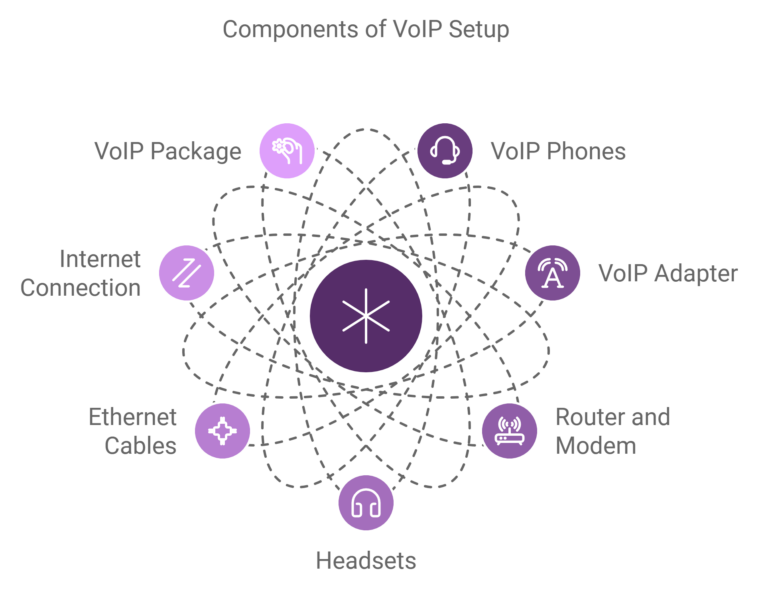
Let us take a look at the basic devices needed to set up a VoIP system.
1. VoIP phones
VoIP phones are the main devices to operate a VoIP phone system on. There are 3 ways you can employ a VoIP phone:
- IP phone
An IP phone is specifically designed for VoIP systems. These phones do not need to be physically connected to a system, hence they can be used remotely. IP phones must have the ability to connect to the internet, eliminating the need to connect them to a router for internet access.
- IP softphone
Softphones are software-based solutions that can be used on any device, whether that be a smartphone, tablet or laptop. They can be accessed through the VoIP application provided by your main network. Since they operate through an application, the quality of their audio depends on the processor of a specific device.
- Landline deskphone
If you want to utilise your traditional deskphones from your previous system in your new VoIP system, it is also possible. In that case, it will bring down your total cost expenditure if you decide to recycle your landline phones with an ATA adapter.
If we talk about the cost factor, IP phone sets can range from £40 – £160, depending on the company.
| Cost | VoIP |
|---|---|
|
Basic High-end Executive |
£40 £100 - £160 £200 - £300 |
2. Subscription to a VoIP software
When setting up your VoIP system, you need a VoIP application subscription to get access to the software. The cost of this package depends on the extent of the features. They vary between £7 – £50 per user, depending on the provider and the length of the contract (monthly or annually).
| Tier of software subscription | What's included | Cost per user per month |
|---|---|---|
|
Basic |
Unlimited VoIP calls, voicemail, customer support, call holding and forwarding. |
£7- £10 |
|
Expensive |
Call centre analytics, CRM integration, voicemail-to-text service, unlimited international calls in addition. |
£15 - £30 |
|
Advanced |
Video conferencing, ring groups in addition. |
£40- £50 |
3. ATA adapter
A traditional landline deskphone can be converted into an IP phone with a VoIP adapter. This way, your landline deskphones can be reused without wasting resources. Different types of VoIP adapters available in the price range of £15 – £180.
| Type of VoIP adapter | Estimated Price Range |
|---|---|
|
Single port Dual Port Multiple ports/ VoIP Gateway |
£15 – £26 £30 – £55 £100 and above |
4. Headsets and microphones
Headsets and microphones are beneficial for broader teams with high call volume. They block background noise, improve audio quality and maintain the user’s privacy during calls. They can come at different prices from £20 – £80, depending on the company and features of the devices.
Optional equipment for VoIP
Adding optional tools can transform your setup into a powerhouse of efficiency and quality. So what options do you have?
1. Power over Ethernet (PoE) switches
PoE switches deliver both power and data through a single Ethernet cable. They simplify installation and reduce clutter, which makes them invaluable for businesses with multiple VoIP phones or devices.
2. Call recording hardware
Want to sharpen your customer service? Call recording hardware is your best friend. From ensuring legal compliance to training your team with real-life scenarios, these devices provide crystal-clear records of your interactions.
For example, companies in industries like finance can use call recording for audit trails and quality of service improvement.
3. Video conferencing equipment
Cameras with HD resolution and multifunctional devices enhance team collaboration and customer service. Combine them with a high-quality VoIP phone and your remote meetings can feel as good as face-to-face interactions.
4. VoIP Gateway
The VoIP gateway is a vital network device that acts as a bridge between different kinds of networks.
The VoIP gateway is crucial for businesses that are not yet ready to discard their existing phone systems, as it converts signals from traditional analogue or digital telephones or the PSTN into IP packets that can travel over the VoIP network and vice versa. This allows you to:
- Connect your old PBX to the cloud using a PRI or digital gateway, and leverage SIP trunking without having to purchase an IP-PBX.
- Use existing analogue phones through a new-age VoIP system with an FXS gateway.
- Ensure reliability by having a gateway automatically switch calls to the PSTN if your internet connection fails.
5. Session Border Controller (SBC)
The SBC, often a virtual appliance or software feature your VoIP provider provides, can even be a physical piece of hardware. It sits on the periphery of your network and serves as a security guard for your VoIP traffic.
It takes care of the security (including denial-of-service attacks and toll fraud), gives you high-quality calls by managing bandwidth, and makes sure that devices play nicely behind your firewall (this is called NAT traversal).
Network requirement for VoIP

A VoIP system is quite reliable but if you set it up without the right network infrastructure, It’s like running a marathon in flip-flops.
Importance of stable internet
For setting up a VoIP system, your internet connection is the backbone of everything. A stable and high-speed internet ensures your voice calls are executed with minimal disruptions. For optimal performance, a VoIP call requires at least 100 kbps per call, but faster speeds provide room for additional features like video calls.
Recommended bandwidth for businesses
Bandwidth needs vary according to the size of your business:
- If you have a small business, a connection of at least 10 Mbps download and 1 Mbps upload speeds can support multiple calls.
- For large corporations (employees over 50), a connection speed of 100 Mbps or higher is needed for voice calls, video calls and other internet-based activities.
VoIP vs Landline vs SIP Trunking: What Is Needed To Make A VoIP Call?
To make the right choice when considering your telecommunications needs, it is essential to understand the differences between regular landlines, VoIP, and SIP trunking.
The table below elaborates on the key differences between landline, VoIP, and SIP trunking:
| Feature | Traditional Landline | Standard VoIP System | SIP Trunking |
|---|---|---|---|
|
How It Works |
Circuit-switching is used over a dedicated network of copper wires to transmit voice. |
Converts voice into digital data packets and transmits them over the internet or private IP network. |
It is a specific technology that connects an existing on-premise PBX (Private Branch Exchange) to the internet, replacing regular phone lines. |
|
Core Equipment Needed |
|
|
|
|
Scalability and Flexibility |
Poor. Adding a new line often requires new physical wiring and hardware installation, making it slow and expensive. |
Excellent. Adding a new user is as simple as assigning a software licence and plugging in a phone or installing an app. |
Good. You can add channels (lines) digitally through your provider without new physical lines, though your PBX hardware has limits. |
|
Typical Cost Structure |
High. It includes per-line rentals, call charges, and expensive hardware maintenance and upgrades. |
Lower and predictable. The monthly subscription fee for each user includes both features and maintenance. |
Moderate. You pay for the number of simultaneous call channels (SIP trunks) you need, often reducing costs compared to traditional ISDN/PRI lines. |
Key Takeaway: A standard VoIP system is perfect for most businesses wanting a simple, feature-rich cloud phone system. However, SIP trunking is ideal if your company is larger and already has a good, solid on-premise PBX that you want to keep using while saving money by switching it to the internet.
If you want to learn more about the difference between landline and VoIP, then see our guide: VoIP vs Landline Phones: Which is Best For Your Business?
VoIP Vs UCaaS: What’s The Difference?
VoIP and UCaaS are often used together, but they are not the same. One is a component; the other is a complete toolkit. Below is a side-by-side comparison:
| Category | VoIP (Voice over Internet Protocol) | UCaaS (Unified Communication as a Service) |
|---|---|---|
|
Primary Function |
The primary function is to enable phone calls over the internet. It is a technology for voice communication. |
It is a comprehensive cloud-based communication platform that encompasses VoIP and various other communication tools. |
|
Included Tools |
The platform offers internet-based calling, phone numbers, extensions, and basic call-handling features such as hold, forward, and transfer. |
The platform offers all the features of VoIP, along with integrated video conferencing, team messaging (chat), file sharing, presence indicators, and mobility through desktop and mobile apps. |
|
Management and Admin |
The platform facilitates basic user and feature management through various portals. |
The platform provides centralised administration for all users, devices, and features. |
|
Best For |
This platform is ideal for businesses that require a simple, reliable, and affordable phone system with basic call functionality. |
Modern, growing businesses, especially those with hybrid or remote teams, that need seamless collaboration across multiple channels. |
|
Underlying Technology |
The technology relies on SIP (Session Initiation Protocol) for the setup and management of voice calls. |
The technology is based on VoIP technology and seamlessly integrates it with various APIs and services to create a unified platform. |
The Bottom Line: If VoIP is a piece of the puzzle, then UCaaS is the whole picture. If your team needs to chat, make video calls, and work from anywhere, then a UCaaS platform is a better long-term solution.
Learn more about UCaaS and VoIP from our guide: VoIP vs UCaaS: Which One Is Best for My Business?
What Is VoIP Gateway: A Brief Explanation
Since the VoIP gateway is such a crucial component in most large or medium-sized businesses, let us look into each of these types in greater detail:
| Gateway Type | Primary Use Case | How It Connects | Best For |
|---|---|---|---|
|
Analogue Gateway (FXS/FXO) |
It facilitates the connection of analogue devices such as phones, faxes, and modems to a VoIP network. |
FXS ports provide dial tone to analog phones; FXO ports connect to analogue lines from the telephone company. |
Small offices looking to use their current analogue phones or fax machines on a VoIP service. |
|
Digital Gateway (T1/E1/PRI) |
Connecting a traditional, on-premise digital PBX to a VoIP network. |
The digital gateway establishes a connection with the PBX's digital ports, similar to PRI lines, and transforms the digital circuit signal into IP packets. |
Medium to large enterprises with a significant investment in a digital PBX who want to benefit from SIP trunking's lower costs. |
|
Cellular Gateway |
The cellular gateway facilitates the provision of a VoIP connection through a 4G/5G cellular network. |
A SIM card is inserted into the gateway, which then connects to the internet via the cellular network. |
Branch offices in remote areas without reliable wired internet, or as a backup connection for business continuity. |
How to choose the right equipment for your business
Now that we have discussed the equipment required for a VoIP setup in detail, let’s see how you can choose the right one for your business needs.
1. Business size and call volume
A small startup might get by with a single VoIP adapter and a basic router, while a call centre requires multi-port VoIP phones and high-speed internet connectivity.
2. Budget constraints
We know budgets can be tight, especially for small businesses. VoIP costs can be high, so start with essentials like a VoIP phone and a high-speed Ethernet cable coupled with stable internet. Upgrade as your business grows.
3. Scalability needs
Your business might be small today but could expand tomorrow. Choosing scalable equipment gives your system the flexibility to grow with you. Meaning? Look for multi-port VoIP adapters and routers with gigabit ports to future-proof your setup.
4. Research and compare brands
Don’t buy the first gadget or package you find. Compare brands for reliability, warranties and customer reviews. This is where Compared Business can help you.
Getting A Reliable VoIP System Is Easy With ComparedBusiness
At ComparedBusiness, we streamline the process of linking businesses like yours with VoIP service providers. Simply provide your business details in under 2 minutes, and we’ll promptly supply you with quotes from reputable VoIP providers across the UK.
FAQs
No, they are not the same. VoIP (Voice over Internet Protocol) is the technology behind internet phone calls. It’s the foundation.
UCaaS (Unified Communications as a Service) is a full-fledged communication platform built on VoIP but comes with an array of complementary add-ons, like video conferencing, team messaging, and file sharing.
One useful way to conceptualise it is as follows: VoIP serves as an ingredient, while UCaaS provides the entire meal.
Yes, in most cases you can. However, there are two principal means to achieve this:
Via an ATA Adapter: If you have a regular analogue desk phone, you can connect it to an Analogue Telephone Adapter (ATA). The ATA connects to your network and converts your old phone’s analogue signals into digital VoIP data.
A Softphone: Your regular phone can become a powerful VoIP device. All you have to do is download your VoIP provider’s app (also known as a VoIP softphone) on your smartphone. This will essentially transform your mobile into a business extension, so you can use your work number over Wi-Fi or mobile data to make and receive calls.
No, you don’t have to purchase a special VoIP router; your existing high-speed modem and a decent-quality business router can handle VoIP traffic just fine.
But if you want to get the best experience possible, especially in a busy office, you need to make sure that your router is configured correctly.
A VoIP call typically requires at least 100 kbps per call for smooth voice quality. If your business has higher call volumes or video integrations, you should look at an internet connection with 1 Mbps per user.
To use a VoIP phone, you’ll need a high-speed internet connection, a VoIP phone adapter or IP phone and access to a VoIP service provider. Additional equipment can include headsets, modems, routers and call recording software.
Yes, existing analogue phones can be used with VoIP by connecting them to a VoIP adapter. This device converts analogue voice signals into digital packets to enable them to integrate with your VoIP network.
No, a landline is not required for VoIP. All voice calls are made through the internet, which eliminates the need for traditional landline infrastructure. However, you will still need a stable internet connection for VoIP calls.