
In today’s business world, communication is an integral element. Whether you’re running a tech startup in London or managing a family business in Manchester, having the right tools to stay connected with clients and employees is non-negotiable. This is where Google Voice and VoIP come into play – two solutions that can help you handle calls, messages and collaboration.
But they’re not the same. This article breaks down their features, highlights the differences and shows you real-world use cases to help you make the best decision. If you want a complete explanation of the VoIP system, start with our VoIP guide first.
What is Google Voice?

Google Voice is a cloud-based telephony service that integrates seamlessly with Google Workspace tools like Gmail, Google Calendar and Google Drive, making it ideal for small teams.
It operates entirely over the internet, which means there’s no need for traditional phone lines. You can make and receive calls, send text messages and manage voice calls – all through your browser or mobile apps. Think of it as having your office phone system right in your pocket.
Compare VoIP Phone System Quotes Today
What is VoIP?

VoIP, short for Voice over Internet Protocol, is a powerful tool that enables voice communication over the internet. Unlike Google Voice, which is a single service, VoIP is a broad technology used by various platforms and providers to deliver flexible and scalable communication solutions for businesses of all sizes.
For example, you can use it for the communication needs of your small marketing agency in Cardiff (basic setup) as well as for your multinational corporation based in London (advanced setup). It’s flexible, scalable and contains advanced features. All these details are coming later in this article.
Google Voice vs VoIP: The differences
When comparing Google Voice vs VoIP, the differences boil down to scale, functionality, cost and features. Both leverage the internet to deliver communication services, but they’re designed for different purposes.
Functionality
Think of Google Voice as a basic, user-friendly telephony service. It’s ideal for solo entrepreneurs and small teams who need a simple solution for calls, voicemails and texts without complex setups.
VoIP, on the other hand, is the Swiss Army knife of communication systems. One of its biggest benefits is that it’s not tied to one service but offers advanced features like video conferencing, analytics and IVR (Interactive Voice Response) as well.
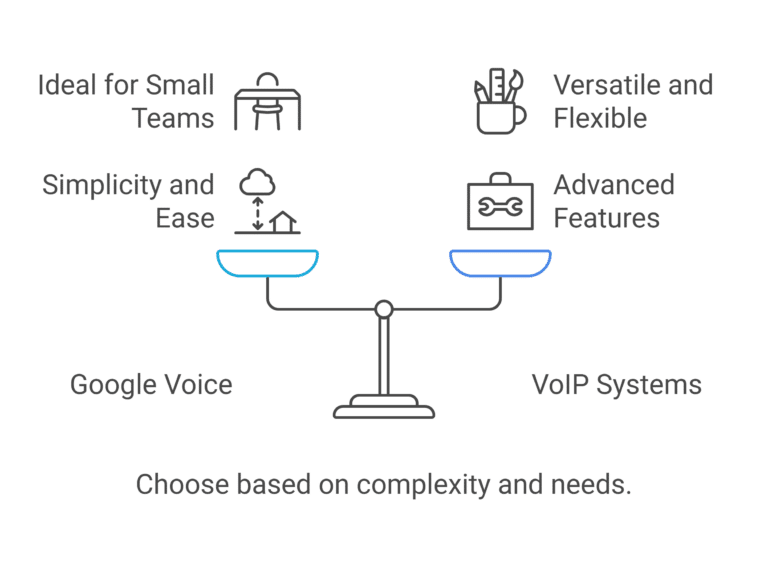
Features comparison
The scope of functionality is larger for VoIP. Google Voice provides the essentials:
- Simple call management: Answer, forward or block calls.
- Voicemail: Access management online or through an app.
- SMS support: Send and receive texts from your business number
VoIP is feature-rich and designed for businesses with greater telephony needs. Features include:
- Call queues and routing: Ideal for managing customer support and sales calls.
- Video conferencing: Host virtual meetings with clients and employees.
- Analytics: Monitor call performance, customer wait times and team efficiency.
Scalability
If you’re thinking about the future, scalability is a big consideration in the difference between Google Voice and VoIP.
Google Voice is designed for small setups, which makes scaling difficult. A growing team might outgrow the basic functionality of Google Voice quickly if they expand to new locations or need features like call distribution and advanced analytics.
VoIP scores high marks in this regard. Whether you’re a two-person team or an enterprise with hundreds of employees, VoIP systems, thanks to their features like mobile VoIP and non-fixed VoIP numbers, can grow alongside your business. For example, if you have a nationwide retail chain, with VoIP, you can connect all locations under a unified system and add new lines when needed without disrupting the operations.
Integration capabilities
Google Voice can integrate seamlessly with Google Workspace tools like Gmail, Calendar and Drive but that’s it. If your business runs entirely on Google’s ecosystem, this might be all you need, but if that’s not the case, you’ll have to look at other options.
A VoIP system comes in handy in this regard. It connects with CRMs, collaboration platforms like Slack, analytics tools and more. For instance, a sales team in Glasgow can use VoIP to track customer interactions directly in their CRM to improve their follow-ups and rate of closing deals.
Cost
Google Voice is affordable and budget-friendly. With plans starting as low as £8 per user per month, it’s a no-brainer for businesses that need a sample and cost-effective solution. For example, if you’re a yoga instructor in Bristol, you can use Google Voice to manage class bookings and client enquiries.
As for the international numbers, the story is as follows:
- If you’re operating a phone line in the US, you’ll be charged international rates when calling international numbers which vary from one country to another.
- If you’re based in any other country and are calling in the US, it’s completely free.
With VoIP, you should be willing to pay a little bit more. Although it depends on the size of the system and the features you want, be ready to pay anything between £20- £40 per user.
The full breakdown of VoIP phone costs is discussed in this article.
Table of comparison between Google Voice and VoIP
| Aspect | VoIP | Cellular |
|---|---|---|
|
Features |
Basic telephony for calls, voicemail, and texts. |
Comprehensive system with video conferencing, analytics, and IVR. |
|
Features |
Simple call management, voicemail, and SMS. |
Call queues, video conferencing, routing, and performance analytics. |
|
Scalability |
Limited; ideal for small setups. |
Highly scalable for businesses of all sizes, from startups to large enterprises. |
|
Integration |
Seamlessly integrates with Google Workspace tools like Gmail and Calendar. |
Connects with CRMs, collaboration tools (e.g., Slack), and analytics platforms. |
|
Cost |
Budget-friendly; starts at £8/user/month. |
More expensive; ranges from £20–£40/user/month based on system size and features. |
Critical Decision Points: What Matters Most When Choosing Between Google Voice And VoIP?

Before we dive into the nitty-gritty details of VoIP and Google Voice, let’s first talk about what really matters when it comes to Google Voice vs VoIP.
Here are five factors; knowing these will enable you to assess which of those features actually make a difference for your business:
1. Team Size and Growth Plans
The first determinant is how big your team currently is:
- 1 to 5 employees: Google Voice is usually good enough when you’re small
- 5 to 10 employees: Google Voice’s inadequacies begin to make themselves known
- 10+ employees: VoIP is more necessary now
- 50-plus employees: Needs VoIP to be competitive
But here’s the thing that most businesses miss: it isn’t about where we are right now; it’s about where you’ll be in 12 to 24 months.
Google Voice’s Starter plan limits up to 10 users. If you plan to scale beyond these limits, you will be forced to migrate (expensive) at a later date or pay double (£20/user/month) for the Standard plan.
Pro tip: If you expect to have more than 15 employees in the next two years, go with VoIP from the start so you won’t get a headache migrating later.
2. Integration Requirements
Before choosing between Google Voice and VoIP, ask this question: What tools does your business already rely on?
Google Voice is best integrated with Google Workspace but not much further. If your business relies on:
- Salesforce or HubSpot for CRM
- Slack for team communication
- Zendesk for customer support
- Custom business applications
- Industry-specific software
That is where the integration power of VoIP comes into play. Modern VoIP solutions integrate with more than 100 business tools, streamlining workflows and centralising customer data.
Ask Yourself: Do you need your phone system to communicate with your other business tools, or are you fine with just Google Workspace?
3. International Communication Needs
Google Voice exclusively caters to the US market. Though it provides the ability to make international calls, that experience is less than ideal:
- High per-minute rates for most of the world
- No international number options
- Limited outside-US SMS functionality
- Primarily US-focused features
In contrast, VoIP services typically offer:
- Local numbers in 50 to 100+ countries
- Competitive international calling rates
- Global SMS capabilities
- Local physical presence in any place you do a business
Example: A London consulting firm that supports European clients might let the French, UK and German numbers be managed all within one VoIP system, ensuring it is easy for alternately located clientele to contact you using local numbers.
4. Advanced Feature Requirements
Think about what features you will really use:
Google Voice Can Handle:
- Make and receive calls
- Voicemail
- Call forwarding
- Simple call management
- SMS messaging
VoIP Can Handle:
- Auto-attendants and IVR
- Call recordings for compliance or training
- Call analytics and reporting
- Video conferencing integration
- Call queuing for customer support
- Ring groups and hunt groups
- Hot desking capabilities
- Advances call routing
The Test: If you need three or more points in the advanced needs VoIP list, then it’s likely that VoIP would be an excellent option.
5. Budget And Whole Life Cost
The pricing is more complicated than it might seem at first.
G-Suite seems reasonably priced at £8 per user per month for Google Voice, but what is the true cost? £15/month when you factor in the mandatory G-Apps subscription. This may seem affordable, but when you consider its cost for a team of 10, it escalates to £150/month.
VoIP systems are around £20 to 40/user/month but will be much more feature-rich. For that same 10-person team paying £25/month per user (£250/month), you get:
- Unlimited scalability
- Advanced features
- Better customer support
- Extensive integrations
- Professional capabilities
The ROI question: Could the power features and integrations save your team 5 to 10 hours a month? If so, VoIP is self-paying because it leads to enhanced productivity.
Advantages And Disadvantages Of Google Voice Vs VoIP
Here is an overview of the pros and cons of both:
Advantages Of Google Voice
- Low Entry Cost: At just £8/month, it’s a very affordable business phone solution. Ideal for startups and small businesses.
- Quick Setup: If you already use Google Workspace, you can be up and running in minutes. No technical expertise required.
- Seamless Google Integration: If your business relies on Gmail, Calendar, and Drive, everything seamlessly integrates. View caller information from your contacts, schedule calls in a calendar, and more.
- Simple User Interface: The learning curve is minimal. If you know how to use Gmail, you can use Google Voice.
- Mobile and Desktop Apps: Answer calls from anywhere with the mobile app or web interface. This feature is particularly beneficial for remote and hybrid teams.
- AI Spam Filtering: Advanced spam blocking prevents your phone from ringing with unwanted calls.
Disadvantages Of Google Voice
- Strict User Limits
- No Toll-Free Numbers
- Limited Integration Options
- Basic Feature Set
- Minimal Customer Support
- US-Centric Design
- Poor Scalability
- Number Porting Limitations
Advantages of VoIP
- Unlimited Scalability: Easily add users as your business grows. There are no hidden costs or unexpected price increases.
- Enterprise-Grade Features: Ability to utilise auto attendants, call recording, analytics, video conferencing and more.
- Extensive Integrations: Integrate with Salesforce, HubSpot, Slack, Zendesk and 100s of other business tools.
- Superior Customer Support: 24/7 phone and chat support along with dedicated account managers.
- Professional Features: Toll-free numbers, call queuing, advanced routing, and functions that can make your small business sound big.
- Better International Options: Phone numbers in 50 to 100+ countries, competitive calling rates and global SMS.
Advanced Analytics: Monitor call volumes, hold times, agent productivity and customer satisfaction. - Reliability and Uptime: corporate-level infrastructure, most offer a 99.99% uptime SLA.
- Custom Features: Customise the system to meet your unique business operations with custom workflows and rules.
Disadvantages Of VoIP
- High initial cost
- More complex setup
- Potential feature overload
- Learning curve
- Requires good internet
Use cases of Google Voice & VoIP
The choice between Google Voice and VoIP depends on your business’s size, structure and communication needs. Here are some practical use cases to help you understand how each system can serve your business.
1. Small businesses: Google Voice for startups
For small teams and solopreneurs, Google Voice is a better option. Its affordability, ease of setup and integration with Google Workspace tools will get the job done. Imagine a coach selling productivity coaching. She wants to keep personal and business communications separate without the hassle of managing two phones.
With Google Voice, she can set up a dedicated business number, take calls from her laptop or phone and even send SMS messages to clients.
2. Medium to large enterprises: VoIP for scalability
Larger organisations often turn to VoIP for its scalability, reliability, and advanced features. Consider a retail chain with multiple stores across Birmingham. Using VoIP, they can connect all locations under a single, unified system. Calls from customers can be routed to the nearest store and managers can hold virtual meetings with team members across branches.
3. Customer-facing businesses: Enhancing support with VoIP
If your business relies heavily on customer interactions, VoIP is the clear winner. Its advanced features like call queuing, IVR and automated routing ensure that customers are handled efficiently. E.g. let’s consider a financial services firm that uses VoIP to manage customer support operations.
When a client calls, an IVR menu guides them to the appropriate department, whether it’s billing, investments or technical support. It also records calls for quality assurance and provides analytics. This is one big reason why VoIP is being used in different industries.
If You Want a Reliable VoIP System For Your Business, ComparedBusiness Can Help
At ComparedBusiness, we streamline the process of linking businesses like yours with VoIP service providers. Simply provide your business details in under 2 minutes, and we’ll promptly supply you with quotes from reputable VoIP providers across the UK.
FAQs
Yes, Google Voice is a VoIP service that uses the internet to make and receive calls. However, it is a simplified version of VoIP with limited features compared to more comprehensive VoIP features.
The main downsides of Google Voice are its limited scalability, lack of advanced features like call routing or analytics, and geographic restrictions for certain features. This makes it unsuitable for larger or more complex businesses.
No, Google Voice is not designed for scalability. It works well for small teams and individuals, but businesses with growing needs often outgrow Google Voice and require a more advanced VoIP system.